Command palette & keyboard shortcuts
⌘⇧P opens the command palette - a searchable list of every action in the app. Type a few characters of what you want, hit ↵, done. Every menu-bar action, sidebar action, and major navigation move is accessible from here.
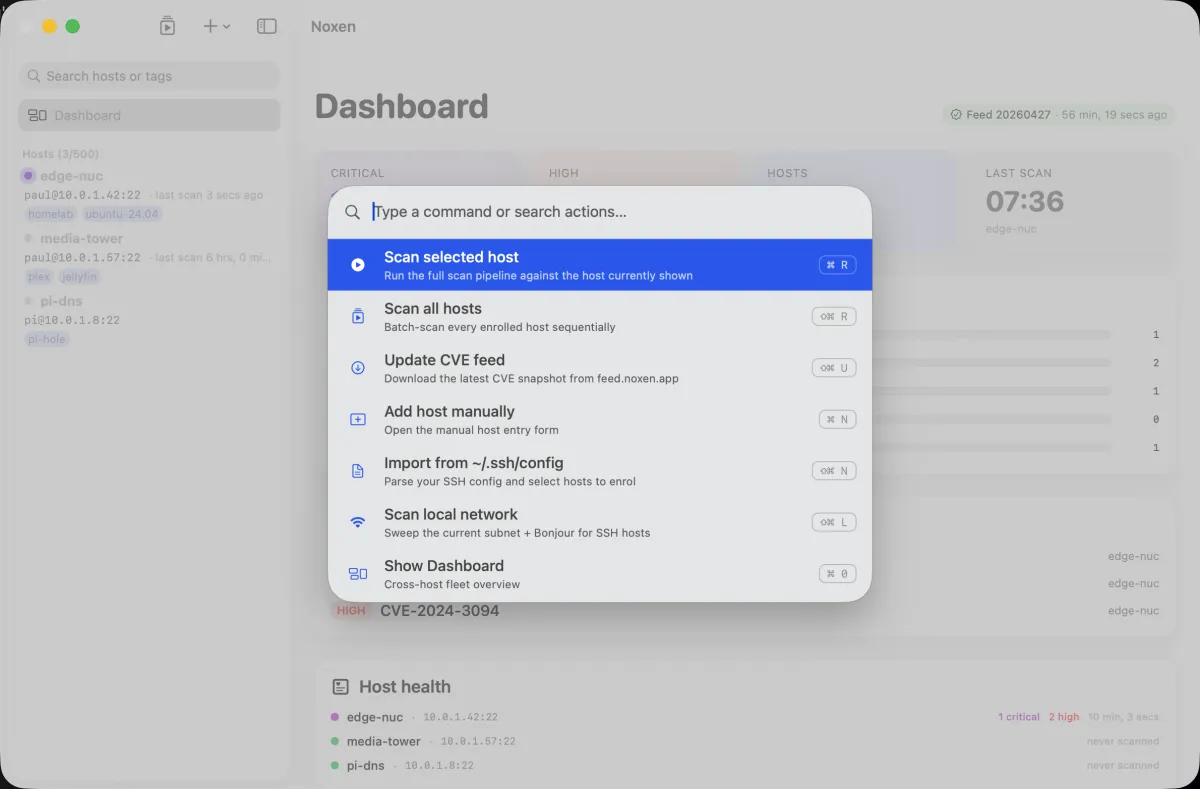
Why a command palette
Two reasons. (1) Discoverability - every action is reachable from one entry point, so you don't memorise menu structures. (2) Speed - three keystrokes is faster than mouse-tracking through a hierarchical menu, especially as the app gains features.
Keyboard shortcuts
| Shortcut | Action |
|---|---|
| ⌘⇧P | Open command palette |
| ⌘N | Add host manually |
| ⌘⇧N | Import from ~/.ssh/config |
| ⌘⇧L | Scan local network (LAN discovery) |
| ⌘R | Scan selected host |
| ⌘⇧R | Scan all hosts |
| ⌘⇧U | Update CVE feed |
| ⌘E | Export findings (PDF / CSV / NDJSON) |
| ⌘0 | Show Dashboard |
| ⌃⌘1 | Select first host in the sidebar |
| ⌘? | Open Noxen documentation |
| ⌘, | Open Settings |
| Esc | Cancel scan / close sheet |
| ⌘W | Close window |
| ⌘Q | Quit Noxen (cancels in-flight scan) |
Reload-custom-checks is an unbound action - invoke it from Scan → Reload custom checks or the command palette. There's no default key binding in v1.0.
Adding to the palette
The palette's action list comes from PaletteAction.all
in the source. New product features that should be discoverable
here are added by the Noxen team in the same PR that adds the
feature. There's no public extension API in v1.0 - custom
palette entries are tracked as a future feature request.
How matching works
Typing filters the action list by case-insensitive substring, matched against each action's title and against a set of keywords attached to it - so "fleet" finds Scan all even though the word is not in the title. The list order is fixed, not ranked by use. Open the palette with no input and you get every action in a stable order, which makes muscle memory reliable.
Accessibility
The palette respects VoiceOver - each result is announced with
its action name, current keyboard binding, and category.
accessibilityReduceMotion short-circuits the
open/close animation so motion-sensitive users don't get the
slide-up effect. The palette is keyboard-navigable end-to-end.